Quick answer: The best GTA 6 thumbnail ideas show one clear subject (a car, a character, a place or your face), use 0–4 big words, and promise exactly what the video delivers. Bright Vice City colours, strong contrast and a simple "before vs after" or "number" hook work well. Avoid fake promises, story spoilers and graphic violence: YouTube can remove misleading thumbnails, and graphic game violence in a thumbnail limits or removes ad revenue. Test up to three versions with YouTube's built-in A/B test.
· 12 min read · By Ridhaan Choudhary, Founder & CEO
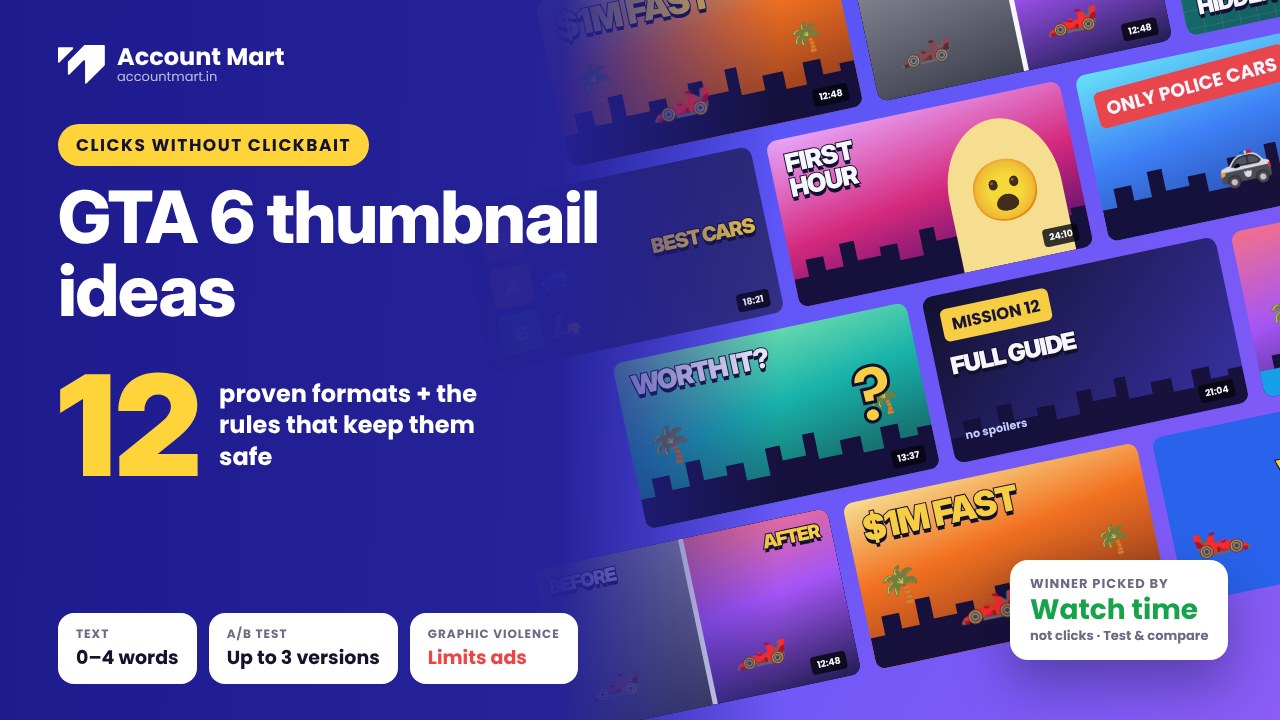
Key takeaways - A thumbnail has about one glance on a small phone screen. One subject, one idea, few words. - Twelve proven formats below, from "price tag" money videos to "map pin" location guides. - YouTube's thumbnail policy bans images that mislead viewers about what is in the video. Repeat violations can lead to strikes. - Graphic game violence in a thumbnail means limited or no ads under YouTube's advertiser-friendly guidelines. - YouTube's "Test & compare" lets you test up to three thumbnails and picks the winner by watch time, not clicks.
GTA 6 is the biggest gaming topic on YouTube right now. That means every search result and every recommendation slot is packed with GTA 6 videos. Most of them use the same neon sunset, the same shocked face and the same red arrow.
Your thumbnail has to stand out in that crowd, honestly. Clickbait might win one click, but YouTube's recommendations care about what happens after the click. If viewers leave quickly because the video doesn't match the thumbnail, your video stops being shown.
This guide gives you 12 GTA 6 thumbnail ideas you can use today, plus the design rules, the YouTube policies that matter for gaming thumbnails, and a simple testing routine.
The 3-second phone test
Before any idea, remember where your thumbnail is seen: mostly on phones, at a small size, while people scroll fast. Ask three questions:
- Can I tell what the video is about in one glance?
- Can I read the text at phone size?
- Does it look different from the five thumbnails next to it?
If the answer to any of these is no, simplify. Remove an element, make the text bigger, or change the main colour.
Anatomy of a strong GTA 6 thumbnail
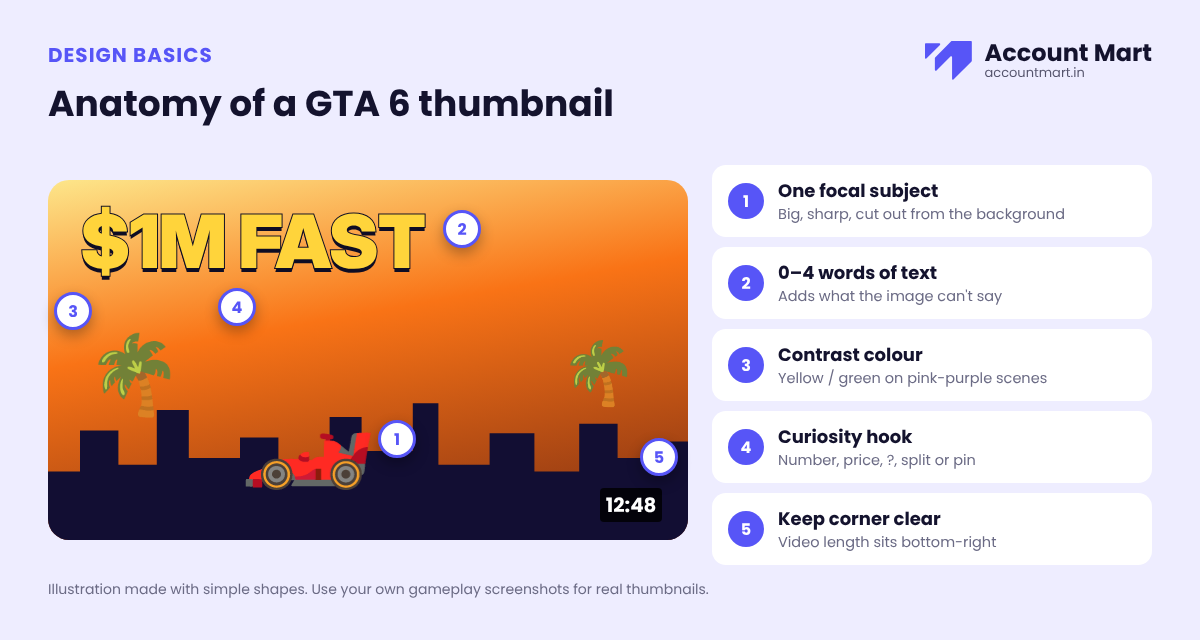
- One focal subject. A car, a character, a location or your face. Big, sharp and cut out from the background.
- A simple background. Blur it or darken it so the subject pops.
- 0–4 words of text. The text adds what the image cannot say. It should not repeat the title.
- A contrast colour. If the scene is pink and purple (very Vice City), use yellow or green for the text or an outline.
- One "curiosity" element. A number, a price, a question mark, a before/after split, or a map pin.
- Safe zones. Keep important things away from the bottom-right corner, where YouTube shows the video length.
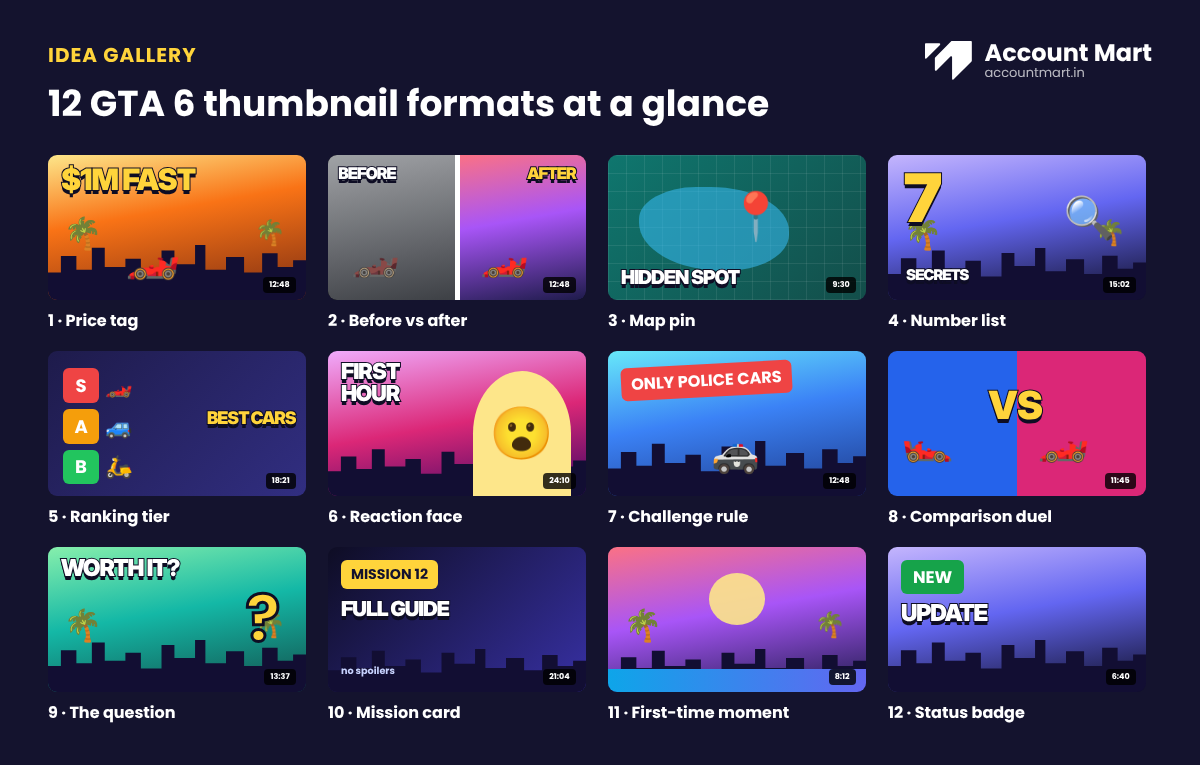
12 GTA 6 thumbnail ideas that work
Here are formats that match common GTA 6 video types. Pick the one that fits your video, not the other way round.
1. The price tag
For money guides and "most expensive" videos. Show the item (car, house, boat) and a big in-game price or amount. Text example: "$1M FAST". Only use it if the video really shows how to get that amount.
2. Before vs after split
For car customisation, character creation, graphics settings or "GTA 5 vs GTA 6". A clean vertical split with a thin line in the middle is instantly readable.
3. The map pin
For location guides, collectibles and secrets. Show a zoomed area of the map or a landmark with a bright pin icon. Text example: "HIDDEN SPOT".
4. The number list
For "10 things", "7 secrets", "5 mistakes". A huge number in one corner plus one strong example image. The number is the hook.
5. The ranking tier
For "best cars", "best weapons", "best businesses". Show a mini tier strip (S, A, B) with one item at the top. People love to disagree with rankings, which drives comments.
6. The reaction face
For first impressions, reviews and live moments. A real, readable expression next to the subject. Faces can help, but only if the emotion fits the video.
7. The challenge rule
For challenge videos: "No running", "$0 start", "Only police cars". Put the rule as the text, and show the situation that makes it hard.
8. The comparison duel
For "Car A vs Car B", "Lucia vs Jason missions", "PS5 vs Xbox". Two subjects facing each other with "VS" between them.
9. The question
For explainers: "Is it worth it?", "Still play GTA Online?". A question mark is a natural curiosity hook, but the video must answer it clearly.
10. The mission card
For walkthroughs. Mission number plus a short, spoiler-free label, in a consistent template. Series viewers find the next episode faster. Our GTA 6 walkthrough channel guide explains why consistency matters here.
11. The "first time" moment
For exploration and photo-mode content. A wide, beautiful shot of a new area with minimal text. In a sea of loud thumbnails, a calm, stunning image can stand out.
12. The status badge
For news and update videos: "NEW", "PATCH", "UPDATE". Keep it honest. Only use "NEW" when the content really is new.
Text on thumbnails: less is more
Most GTA 6 thumbnails fail because of too much text. Here are simple rules.
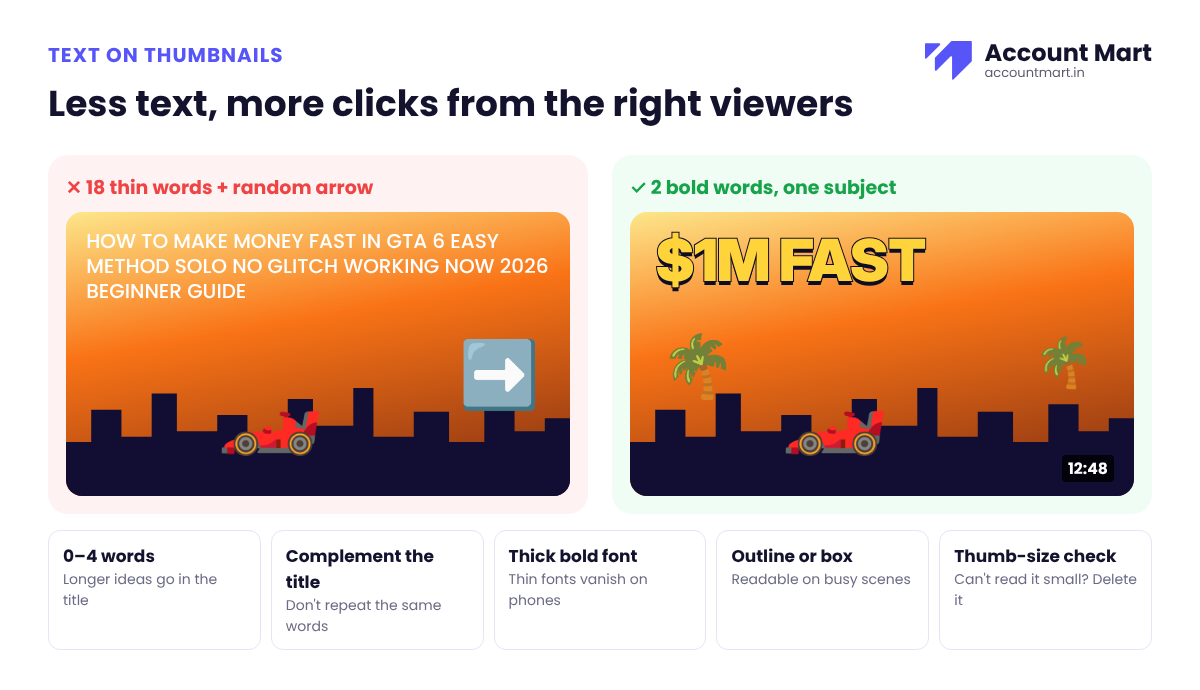
- 0–4 words. If you need a sentence, it belongs in the title.
- Complement the title. Title: "How to make money fast in GTA 6". Thumbnail text: "$1M IN 1 HOUR?" Not the same words twice.
- Thick, bold fonts. Thin fonts disappear at phone size.
- Outline or shadow. Text needs a dark outline or a solid box to stay readable on busy game scenes.
- No tiny labels. If you can't read it when the thumbnail is the size of your thumb, delete it.
- Language. For Hindi or regional audiences, try both native script and Hinglish (Latin script), and test which one your viewers respond to.
Faces, or no faces?
Faces can help viewers connect with a creator, especially in reviews and live content. But a face is not required. Many successful gaming channels are faceless and use the game world as the "character".
- Use a face if your personality is the product (reactions, commentary, challenges).
- Use a game character or car if your content is the product (guides, locations, builds).
- Never fake an emotion that does not happen in the video. Viewers notice, and it hurts trust.
Running a faceless channel? Read how to run a faceless GTA 6 channel.
The rules: what can get a thumbnail removed or demonetized
A great thumbnail that breaks a rule is a liability. Three YouTube rulebooks apply.
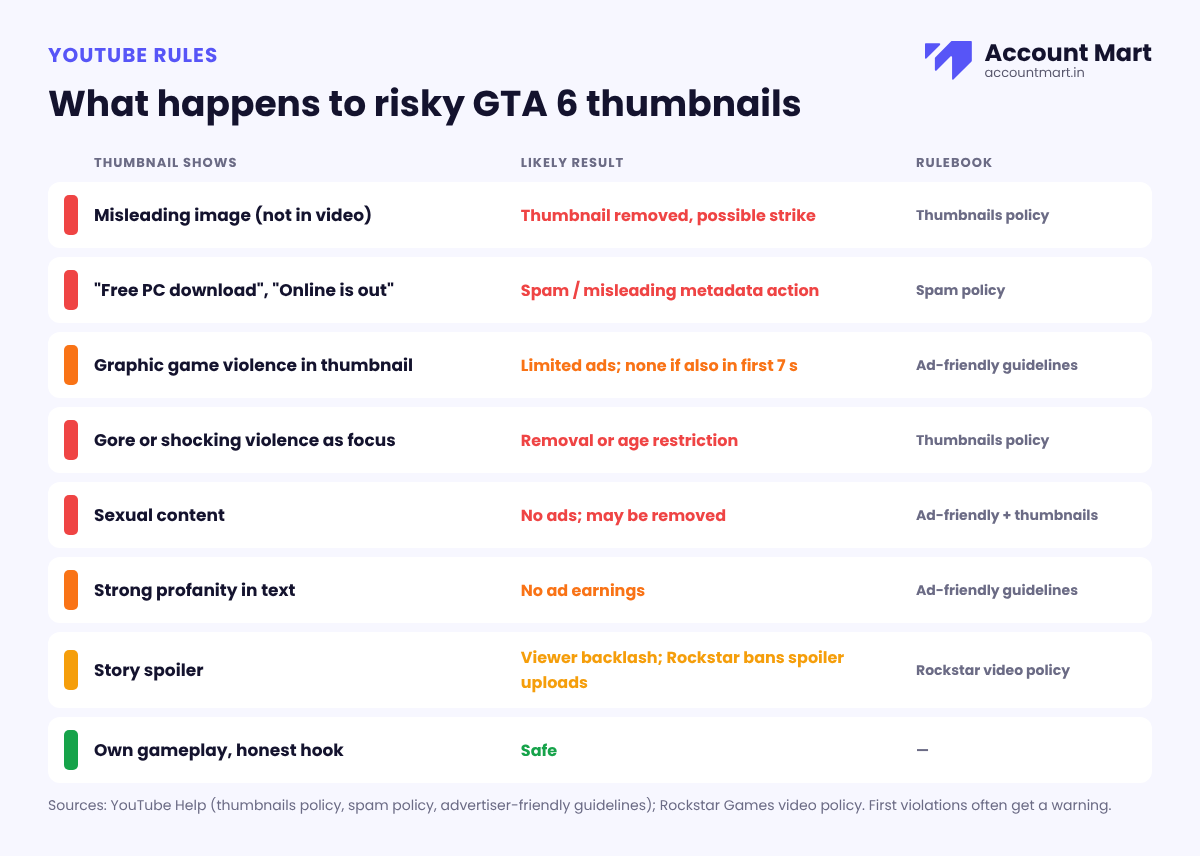
1. Thumbnail policy (Community Guidelines). YouTube's thumbnail policy does not allow thumbnails that mislead viewers "to think they're about to view something that's not in the video". It also bans thumbnails with sexual content, shocking or disgusting violence, gore, and vulgar language. When a thumbnail breaks the rules, YouTube removes it and may issue a strike. For a first violation, you are more likely to get a warning.
2. Spam and misleading metadata. YouTube's spam policy prohibits "maliciously misleading titles, thumbnails, descriptions, or imagery" that promise something the video does not deliver. Classic GTA 6 examples: "FREE GTA 6 PC DOWNLOAD", "GTA 6 ONLINE IS OUT" when it isn't, or a fake "leaked ending" image.
3. Advertiser-friendly guidelines (money). YouTube says its ad rules apply to all parts of a video, including the thumbnail. Graphic game violence in the thumbnail means limited ads, and graphic game violence in the thumbnail or the first seven seconds can mean no ads. Sexual content in a thumbnail means no ads. Strong profanity in the thumbnail or title also removes ad earnings. See GTA 6 YouTube ad rules for violence.
YouTube can also age-restrict a video or remove a thumbnail without a strike when a thumbnail isn't suitable for all audiences, for example when violent or gory imagery is the focal point. Age restriction reduces where your video can be shown.
Spoilers in thumbnails: just don't
A thumbnail is seen by everyone, including people who have not finished the game. Showing a major story twist in a thumbnail ruins it for thousands of viewers who never clicked. It also makes your channel the one people mute.
- Write "Ending explained (spoilers)" in the title, and keep the thumbnail neutral.
- Use a location or a mood instead of a story moment.
- Never show a character's fate or a big reveal.
Rockstar's own video policy also bans uploads focused on the ending and big story reveals. Read GTA 6 leaks, spoilers and strike risks for the full picture.
Use your own screenshots
The best GTA 6 thumbnails are made from your own gameplay. Use photo mode or pause a clean frame, then edit. This keeps your thumbnail unique, avoids copying other creators' work, and makes it clear your video is real gameplay. Avoid styling your thumbnail to look like an official Rockstar announcement.
Test & compare: let YouTube pick the winner
You don't have to guess. YouTube Studio has a built-in A/B test for titles and thumbnails.
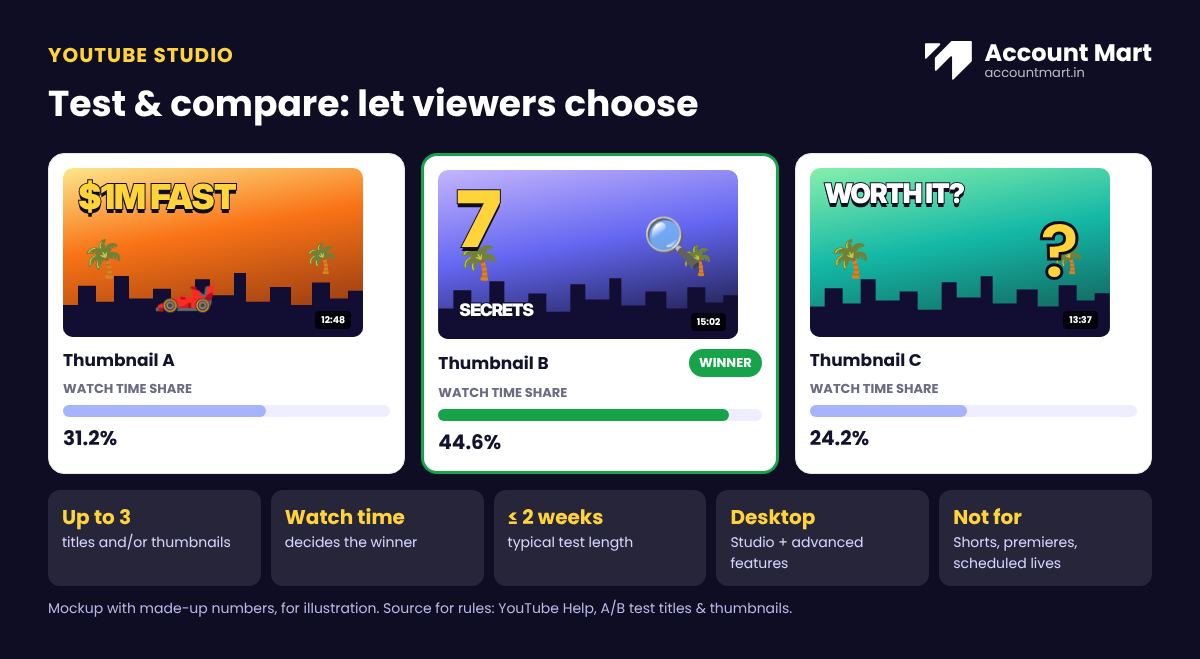
- You can test up to three thumbnails (or titles, or both).
- YouTube picks the winner by watch time share, not by clicks. A thumbnail that brings the right viewers beats one that just brings more clicks.
- Tests usually finish within two weeks, sometimes in a few days.
- It works on computers in YouTube Studio, with advanced features enabled.
- Shorts, scheduled live streams and premieres are not eligible. Made-for-kids, mature and private videos can't be tested either.
- Results show as Winner, Performed same or Inconclusive. If inconclusive, the first thumbnail you uploaded is kept.
A smart test changes one thing: the subject, the text or the colour. If you change everything, you won't know what worked. More in our test and compare thumbnails guide.
Technical specs
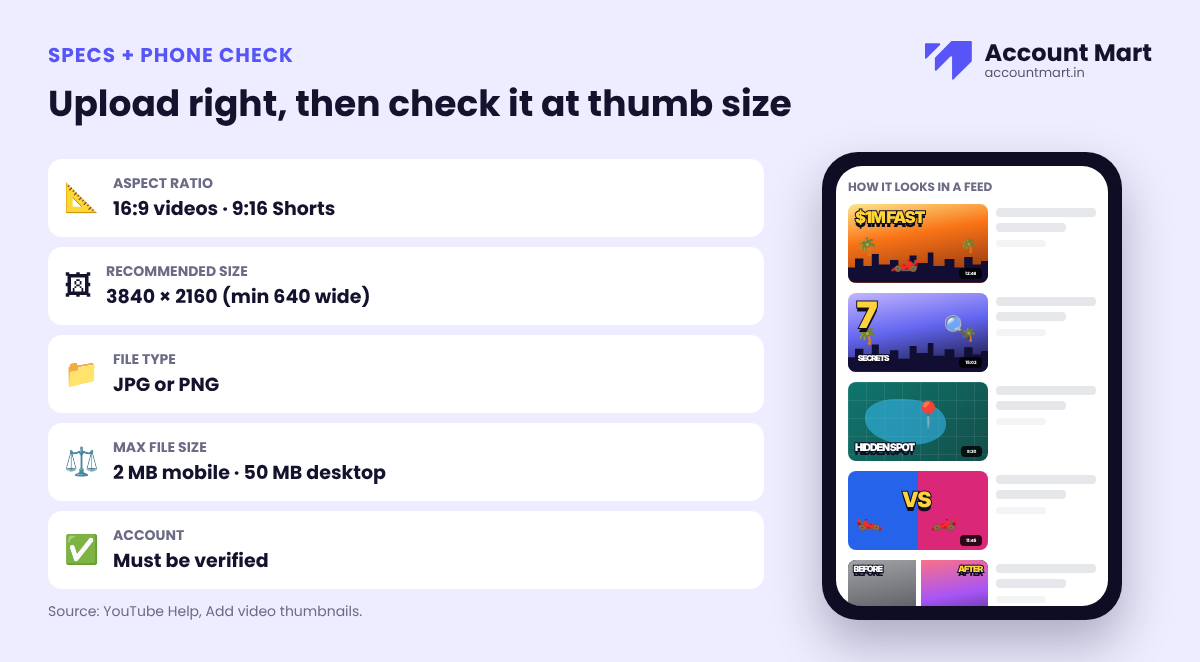
- Aspect ratio: 16:9 for videos (9:16 for Shorts).
- Recommended resolution: 3840 × 2160 for videos. Minimum width 640 pixels.
- File types: JPG or PNG.
- File size limit: 2 MB when uploading on mobile, 50 MB on desktop.
- Account: you need a verified account to upload custom thumbnails.
Many creators design at 1280 × 720 and export at a higher size. Whatever you choose, preview it at a small size before you upload.
Common GTA 6 thumbnail mistakes
- Using the same neon sunset background as everyone else.
- Four or more elements fighting for attention.
- Text that repeats the title word for word.
- Red arrows and circles pointing at nothing important.
- Graphic kills or blood as the main image.
- "Leaked", "free download" or "online is out" promises the video doesn't keep.
- Changing your style every week, so subscribers can't recognise your videos.
Make your channel worth more
Good packaging doesn't just bring views. A channel with consistent branding, clean thumbnails and no policy warnings is also easier to grow and more attractive if you ever decide to sell it. At Account Mart, every listing discloses strikes, warnings and limited-ads labels, because buyers check them.
Account Mart is a registered company, MRC Account Mart Private Limited (GSTIN 08AAQCM9755R1Z3), working in the channel business since 2018. Our app has 500K+ downloads on Google Play and our Instagram community has 50K+ followers. Reach us only on our official numbers: +91 72400 00934, +91 72400 00935, +91 72400 00936. Don't trust calls or messages from any other number claiming to be Account Mart.
Frequently Asked Questions
What is the best size for a GTA 6 thumbnail?
16:9 ratio. YouTube recommends 3840 × 2160, with a minimum width of 640 pixels. Use JPG or PNG.
How many words should a gaming thumbnail have?
0–4 words is a good rule. Put longer messages in the title.
Can a thumbnail get my channel a strike?
Yes. YouTube may remove thumbnails that break its policies and issue a strike, though first violations often get a warning.
Is showing GTA 6 violence in a thumbnail allowed?
Normal gameplay action is common, but graphic game violence in a thumbnail limits ads, and shocking or gory images can be removed or age-restricted.
Do faces in thumbnails get more views?
Faces can help when your personality is the content. For guides and locations, a clear game subject often works just as well. Test both.
What is YouTube Test & compare?
A Studio tool that tests up to three titles and/or thumbnails and chooses the winner based on watch time.
Can I A/B test Shorts thumbnails?
No. Shorts, scheduled live streams and premieres are not eligible for Test & compare.
Can I use the official GTA 6 logo or artwork?
It's safer to build thumbnails from your own gameplay screenshots and avoid looking like an official Rockstar release.
Should I put spoilers in my thumbnail?
No. Keep thumbnails spoiler-free and warn in the title instead.
Why can't I upload a custom thumbnail?
Custom thumbnails require a verified account. Check your account's verification status in YouTube Studio.
Put it into practice
Choose two of the twelve ideas that fit your next video, design both, and run a Test & compare. Keep the winner's style as your template.
- Get more ideas from GTA 6 YouTube channel ideas.
- Match titles to thumbnails with GTA 6 YouTube SEO.
- Learn the basics in our YouTube thumbnail tips.
- Want a gaming channel with a head start? Browse accountmart.in/buy-accounts, or get a free valuation at accountmart.in/sell-accounts.
Sources: YouTube Help, Thumbnails policy (support.google.com/youtube/answer/9229980); YouTube Help, Spam, deceptive practices and scams policies (answer/2801973); YouTube Help, Advertiser-friendly content guidelines (answer/6162278); YouTube Help, A/B test titles and thumbnails (answer/16391400); YouTube Help, Add video thumbnails (answer/72431); Rockstar Games Support, video policy.
About the author: Ridhaan Choudhary is the Founder & CEO of Account Mart. He is an entrepreneur, YouTuber and influencer with 450K+ Instagram followers, has been in the YouTube channel business since 2018, and has discussed YouTube growth in podcasts and news interviews.